

1 min readMicrosoft Flow – Send Auto-Response Email for Out of Office Hours

1 min readMicrosoft Flow – Send Auto-Response Email for Out of Office Hours

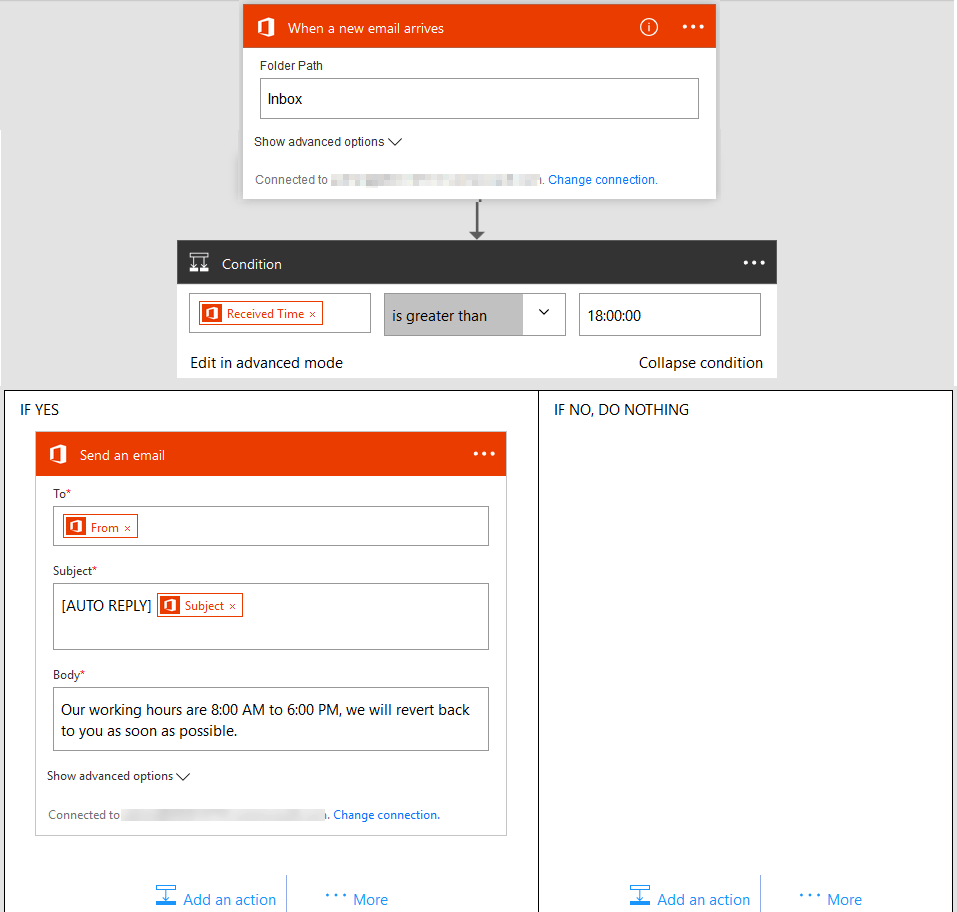
The below Flow shows how to send auto-response email when an email is
received after office working hours. In the sample Flow below,
auto-response email is send to the sender if an email is received after
6:00 PM.

In the condition, we need to use “Received Time” parameter and mention
the time in HH:MM:SS format without any quotes. If you are from Azure
Logic App, and trying the advanced editor, don’t use triggerBody(), it
will results in “ExpressionEvaluationFailed” error. Currently in Flow,
the triggerBody() construct is not working and we need to use the
parameters available with Flow.

Migrate Everything to Microsoft 365

Exchange Online SharePoint Online OneDrive For Business Microsoft Teams Microsoft Planner Viva Engage (Yammer) Microsoft Bookings Microsoft Forms Power Automate Microsoft Power BI Exchange Online SharePoint Online OneDrive For Business Microsoft Teams Microsoft Planner Viva Engage (Yammer) Microsoft Bookings Microsoft Forms Power Automate Microsoft Power BI
  • No Data Loss
  • Zero Downtime
  • ISO-Certified Protection

Start your free 15-days trial today !


4.5 out of 5














