

Microsoft announced Live Events feature in Microsoft Teams. Live Events
in Teams will replace Skype Broadcast in future.
You can broadcast the live events to
- Selected users and groups in your organisation
- Everyone to your organisation
- Public – Outside your organisation. Users can join anonymously
By default, Public option is disabled. If Public broadcast option is
enabled in Global policy in Live events policies, then everyone
in your organisation can host public live events. As an administrator we
might require to enable the public live event for select set of users
alone. To do this,
- Create a new Live events policy with public events enabled
- Grant this policy to the select users alone
Enabling it for select users from Teams & Skype for Business Admin
Center is not user friendly, at the time of writing this blog,
navigating to individual user and enable it. In this blog, let’s get it
done through PowerShell.
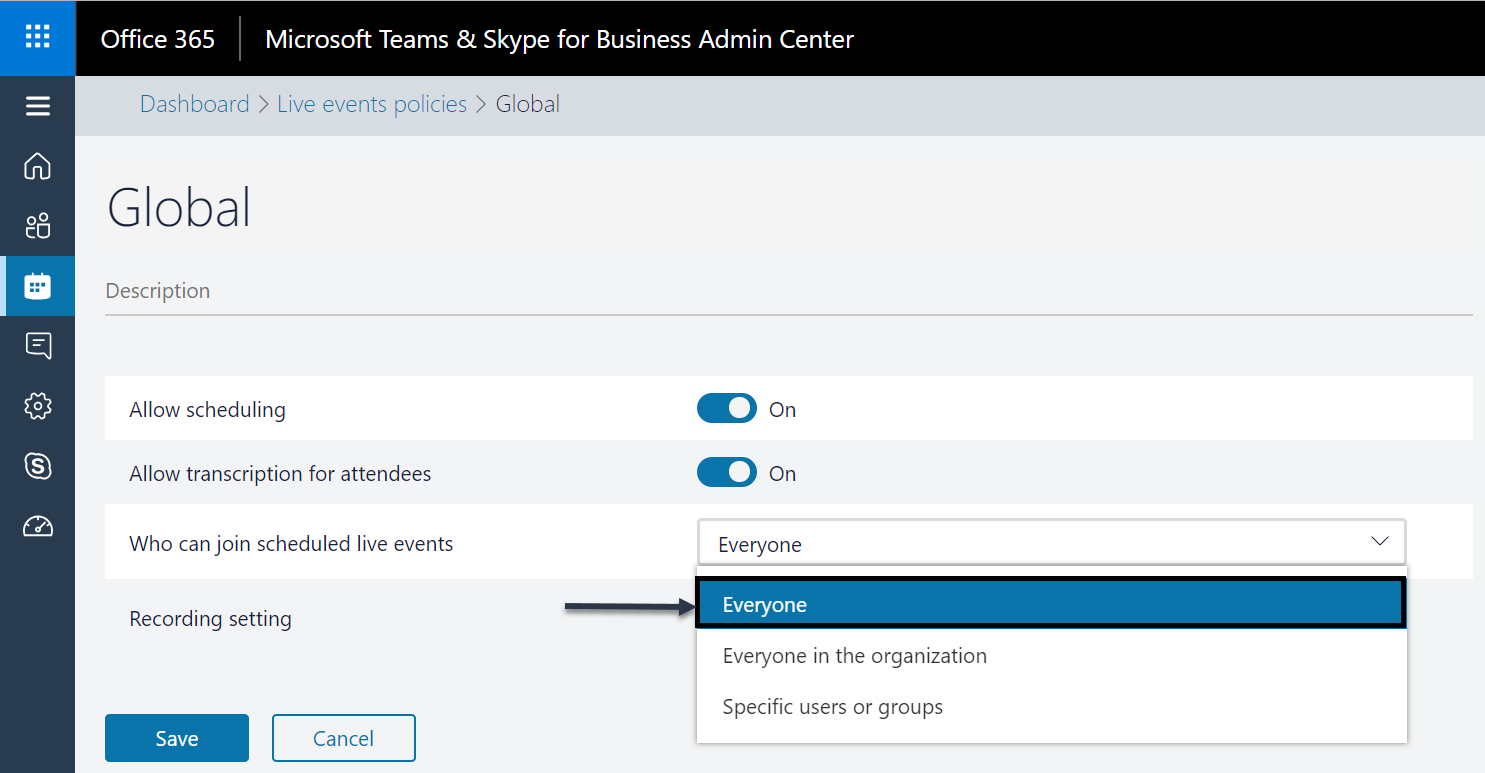
To enable the public live event in Teams,
- Goto Microsoft Teams & Skype for Business Admin Center
- Meetings -> Live events policies -> Global
- Set Who can join scheduled live events to Everyone
Now let us create a new live event policy with public enabled and grant
this policy to a set of users through CSV file using PowerShell.
            #1.Connect to Teams
            Import-Module SkypeOnlineConnector
            $cred = Get-Credential
            $session = New-CsOnlineSession -Credential $cred
            Import-PSSession $session

            #2.Create new boardcast policy with public enabled
            New-CsTeamsMeetingBroadcastPolicy -Identity PublicAllowed -BroadcastAttendeeVisibilityMode Everyone

            #3.Parse users from Csv file
            $csv = Import-Csv c:usersperumaldesktopfilename.csv
            foreach($username in $csv)
            {
                #3.1.Assign the new policy to each user
                Grant-CsTeamsMeetingBroadcastPolicy -Identity $username.upn -PolicyName Tag:PublicAllowed
            }
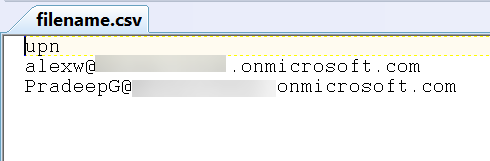
Below sample CSV file to use.
For more information in Microsoft Teams – Live event, follow the below
resources.
https://techcommunity.microsoft.com/t5/Microsoft-Teams-Blog/Live-events-in-Microsoft-Teams/ba-p/214955
https://docs.microsoft.com/en-us/microsoftteams/what-are-teams-live-events
Microsoft Mechanics video Teams Live
Event
















