


Recently Microsoft released much awaited group based license management
in Azure AD for users. Now users will have direct license assigned to
them or inherited group based license. In this blog, using PowerShell we
shall check whether the user is assigned with direct license or group
based license. In the next blog, we shall check [how to get the licenses
applied to groups in Azure
AD](/blog/how-to-list-out-all-groups-with-all-applied-license-using-powershell).
Find users license type using PowerShell
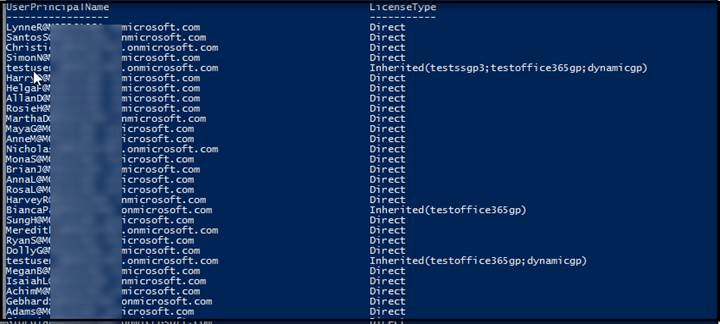
The below PowerShell script will get all the users with their license
type. If users are member of multiple groups with licenses applied, you
will get group’s name with semi-colon separated.
Prerequisites
Before starting the process, download and install Azure AD PowerShell
module from this
link.
Then execute the script in PowerShell (with Run as Administrator
privilege) by connecting to MsolService as global admin.
Copy the below script to notepad and save it as
all-users-with-license-type.ps1
function Users-LicenseType
{
    Param(
    [System.Management.Automation.PSCredential]$cred
         )
    Connect-MsolService -Credential $cred
    $Gplist= @{}
    $Group =Get-msolgroup
    # Get all groupname with group objectId
    foreach($gp in $Group)
    {
    $Gplist+=@{$gp.ObjectId.ToString() = $gp.DisplayName}
    }
    $users= Get-MsolUser -All
    $AllUser = @()
    # Find Users License Type
    foreach($user in $users)
    {
        $UserList = "" | Select "UserPrincipalName","LicenseType"
        $lic=$user.Licenses.GroupsAssigningLicense.Guid
        if($lic -ne $null)
        {
         $GpName = ''
         foreach($lc in $lic)
         {
            If($GpName) {
                         if($Gplist.Item($lc.ToString()) -ne $null)
                         {
                         $GpName=$GpName + ";" + $Gplist.Item($lc.ToString())
                         }
                     }
                Else {
                        if($Gplist.Item($lc.ToString()) -ne $null)
                         {
                         $GpName=$Gplist.Item($lc.ToString())
                         }
                      }
          }
          $UserList.UserPrincipalName = $user.UserPrincipalName
          $UserList.LicenseType = "Inherited("+$GpName+")"
          $AllUser+= $UserList
          $UserList =$null

        }

        Else
        {
        $UserList.UserPrincipalName = $user.UserPrincipalName
        $UserList.LicenseType = "Direct"
        $AllUser+= $UserList
        $UserList =$null

        }
    }
    return $AllUser
}

$cred =Get-Credential

$Listofusers = Users-LicenseType -cred $cred

$Listofusers
Example 1: Get all user’s license license type
PS C:PowershellQuery> & '.all-users-with-license-type.ps1
Result
Example 2: Export all users license type to csv
PS C:PowershellQuery> & '.all-users-with-license-type.ps1'  |Export-Csv
"C:PowershellQueryExportAllUser.csv"  -NoTypeInformation
Example 3:
How to find license type for an user
PS C:PowershellQuery> & '.all-users-with-license-type.ps1' | Where-Object {$_.UserPrincipalName -like "Admin@modxxxxx.onmicrosoft.com"}
Result

Find license type for multiple users
PS C:PowershellQuery> & '.all-users-with-license-type.ps1' | Where-Object {$_.UserPrincipalName
-like "Admin@modxxxxx.onmicrosoft.com"  -or $_.UserPrincipalName -like "testuser1@modxxxx.onmicrosoft.com"}
Result

















