


Microsoft released the most awaited feature of restoring the deleted
Office 365 Groups with all its feature and data. You can restore the
deleted Office 365 Groups within retention period using PowerShell.
This feature is available from latest Azure AD Preview v2 PowerShell
module. You can follow the installation steps from following Microsoft
URL.
https://docs.microsoft.com/en-us/powershell/azuread/
Restoring Contents from deleted Office 365 Groups
After restoring the Office 365 Groups, you will get following features
and properties in Office 365 Groups.
- Azure ActiveDirectory (AD) Office 365 Groups object, properties and
members - Group SMTP address
- Exchange Online shared inbox and calendar
- SharePoint Online team site and files
- OneNote notebook
- Planner
- Yammer Groups
- Teams
How to list out deleted Office 365 Groups using PowerShell
Default retention period for Office 365 Groups is 30 days. Run the
following command to get all deleted Office 365 Groups which are in the
retention period.
Get-AzureADMSDeletedGroup
Result
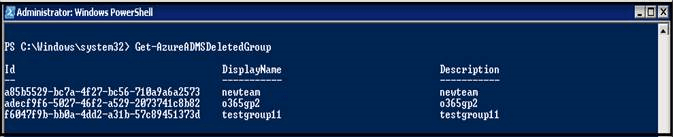
Note the object-id of the Office 365 Group to be restored.
Restore Deleted Office 365 Groups Using PowerShell
Run the following command to restore the deleted Office 365 Groups
Restore-AzureADMSDeletedDirectoryObject –Id
Restoring the Office 365 Groups will takes few minutes but in some
cases, it may take upto 24 hours for complete restore.
Note
To verify that the group has been restored successfully, run the
following command
Get-AzureADGroup –ObjectId
How to Permanently delete Office 365 Groups before retention period
Some of Groups you don’t want to wait for retention period (30 day) for
Permanent removal, so you can run the following command.
Remove-AzureADMSDeletedDirectoryObject –Id
Note
You can get objectId value of Deleted Office 365 Group from
Get-AzureADMSDeletedGroup command.
















