


Its eminent that the usage for the Office 365 Video increases among the
enterprises and educational institutes. Educational institutes wants to
create channels for each grades and maintain the class videos there.
Enterprises wants to maintain the executive messages, training videos,
HR policies etc.… in the channels.
Common management activities include:
- ** Bulk creation of channels with required permission
- ** Bulk upload videos to different channels
- ** Bulk update the channel permissions
- ** Move / Copy videos between channels
- ** Delete videos
- ** Set Storage Quota
We have already posted PowerShell scripts to perform some of the
management activities
Manage Office 365 Video Channel Permissions using PowerShell
Set Storage Quota for Office 365 Video
[http://www.jijitechnologies.com/blogs/set-storage-quota-for-office365-video-channels-using-CSV]
With GingerEx Office 365 Video
Management tool, the above said
tasks can be simplified. Let us explore it.
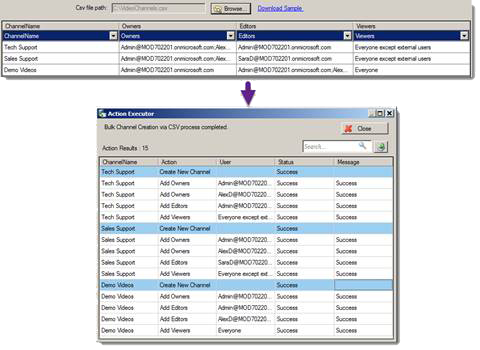
Bulk creation of channels with required permission
With bulk channel creation feature, you can create multiple channels
with required permissions through csv.
Bulk upload videos to different channels
You can upload multiple videos into different channels using csv file.
You can even re-try the failed upload videos.

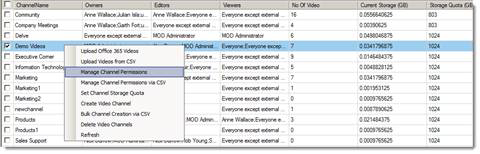
Update channel permissions
- Update individual channel permissions
- Update multiple channel permissions through csv file
- Add / Remove permission
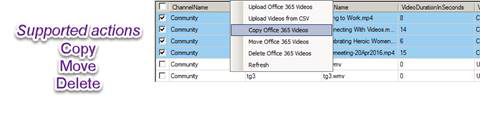
Supported individual video operations
- Move / Copy / Paste videos between various channels
- Delete videos in the channels
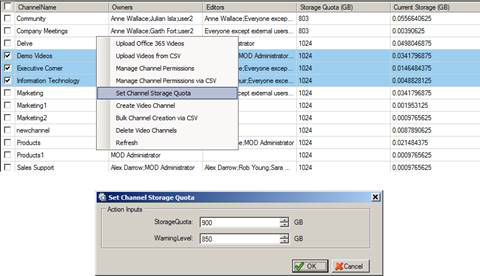
Set Channel Storage Quota
- Get report on existing channel storage quota
- Edit the existing channel storage quota
Other important features
- Migrate video assets from existing SharePoint to Office 365 Video
- Channel statistics report[Storage Quota, No. of videos, video views
count] - Audit the video channels [Audit channel permission change, audit
viewers of the video]
Download Request – GingerEx Office 365 Video Management
Submit
















